Most SaaS products don't lose users because a feature is missing. They lose them in the first ten minutes, on a confusing setup screen, an empty dashboard or an AI answer nobody trusts. Good UI/UX design for SaaS and AI products is the work that fixes those moments, and in 2026 it has more moving parts than it did two years ago.
We're eider, a UI/UX design and development studio for SaaS and AI teams. We've been doing this since 2020 from Surat, India, for clients around the world. This guide shares what we see in our own projects and what neutral research says about the market, so you can plan your next product design project with clear eyes.
You'll get the key research on AI product UX, what usability work is worth, the 5-step process we use, real examples from our work, what drives cost, and a checklist.
Short answer: UI/UX design for SaaS and AI products means designing the flows people repeat every day, plus the extra states AI adds: waiting, uncertain answers, wrong answers and trust. Start with research on real users, design a reusable system, and test prototypes before you build. Research links better usability to better business results.
In this guide
- What makes UI/UX design for SaaS and AI products different?
- How do AI features change product UX in 2026?
- Is SaaS UX design worth the investment?
- How eider approaches UI/UX design for SaaS and AI products
- What does a product design engagement cost, and why?
- A SaaS and AI product UX checklist
- FAQ
TL;DR: SaaS and AI product UX in 2026
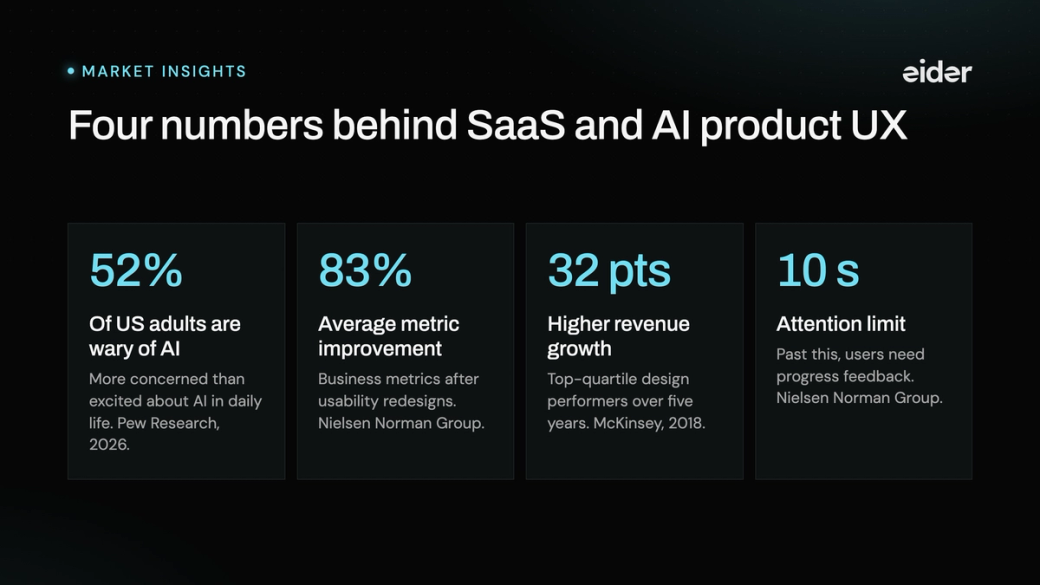
- People are wary of AI. 52% of US adults say they're more concerned than excited about AI in daily life (Pew, 2026). Your UI has to earn trust.
- Explain, cite and admit limits. Put sources next to the claim they support and show limitations in the main interface, not a footnote.
- Design the wait. Past about 1 second users need a sign the system is working; past 10 seconds they need progress.
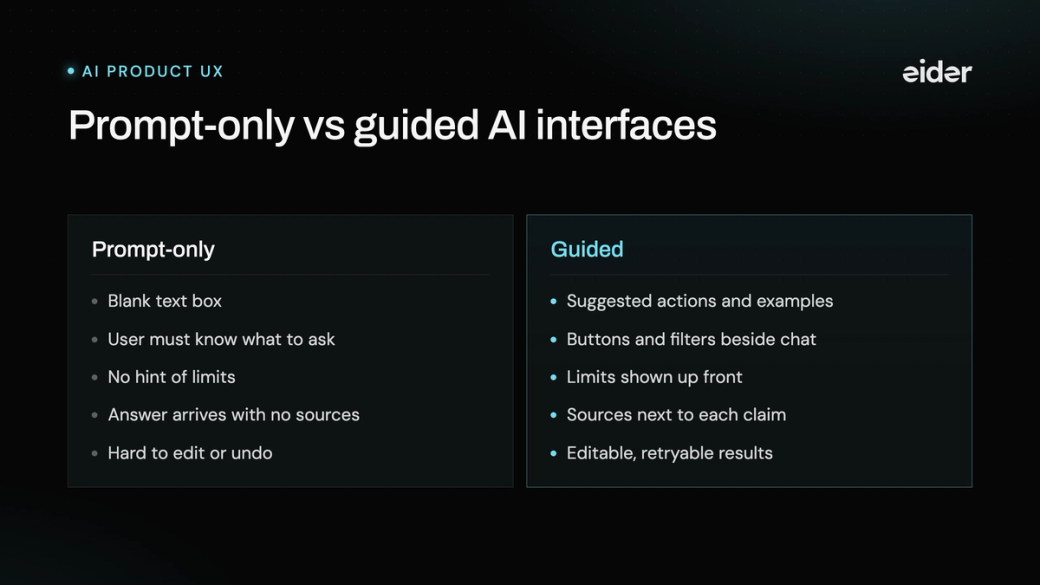
- Don't rely on a blank prompt box. Writing good prompts is hard for many people. Mix chat with buttons, examples and guided steps.
- Usability pays. NN/g found redesigns improved business metrics by 83% on average.
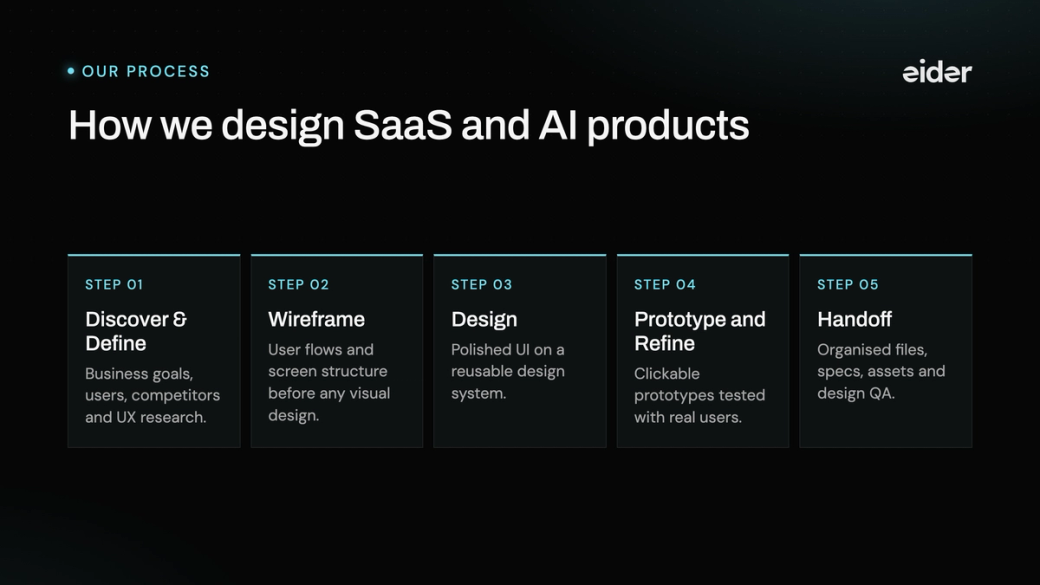
- Our process: Discover & Define, Wireframe, Design, Prototype and Refine, Handoff.
- Cost depends on scope, not hours alone: number of flows and screens, research depth, platforms and whether you need a design system. Book a call for a real number.
What makes UI/UX design for SaaS and AI products different?
A marketing website is visited. A SaaS product is used, often for hours a day. That changes the job. The design has to work on day one for a new user and on day 300 for a power user, across roles, permissions, data states and devices.
AI features add a second layer. A normal button does the same thing every time. An AI feature might give a different answer each time, take several seconds, or be confidently wrong. Each of those is a state someone has to design.
Design area | Typical SaaS product | SaaS product with AI features |
|---|---|---|
First use | Onboarding and empty states | Same, plus teaching what the AI can and can't do |
Speed | Most actions feel instant | Answers can take seconds, so the wait needs design |
Output | Predictable results | Variable results that need checking, editing or retrying |
Errors | Validation and system errors | Wrong or made-up answers that look correct |
Trust | Comes from reliability | Must be built with sources, limits and user control |
Input | Forms, filters and buttons | Prompts, plus guided options for people who don't write prompts |
The market context matters too. Public trust in AI is low. Pew Research found that 52% of US adults are more concerned than excited about the increased use of AI in daily life, up from 37% in 2021. Your users bring that doubt into your product.
How do AI features change product UX in 2026?
Here are the five areas where we see AI change the design work most, with what neutral research recommends for each.
Trust and explainability
Nielsen Norman Group's December 2025 article on explainable AI in chat interfaces warns that when chatbots present outputs confidently, users may place undeserved trust in them. It also notes that citations can be made up or may not support the claim, and that users rarely click them. Its advice: place sources next to the claim they support, avoid vague labels like "Source", and put plain-language limitations in the main interface, paired with a clear action such as checking the output.
Google's People + AI Guidebook and Microsoft's Guidelines for Human-AI Interaction say the same thing in different words: make clear what the system can do, and how well it can do it. Microsoft's 18 guidelines, published at CHI 2019, were tested by 49 design practitioners against 20 AI products.
Latency and waiting
NN/g's response time limits still hold: 0.1 second feels instant, 1 second keeps the user's flow of thought, and 10 seconds is the limit for keeping attention. Many AI tasks sit between 1 and 10 seconds or beyond. So we design visible progress, streaming or partial results, and a way to cancel or keep working while the AI runs.
Empty states and first use
An empty dashboard is the first screen many SaaS users see. NN/g's empty state guidelines say to show system status, teach through the empty state, and give a direct path to the next step. For AI features we add examples of good requests and a short note on what the feature can't do yet.
Prompts vs guided UI
A blank prompt box looks simple but hands all the work to the user. In AI: First New UI Paradigm in 60 Years, Jakob Nielsen calls this the articulation problem: many people struggle to describe what they want in written prose. He expects future AI systems to use a hybrid interface that mixes typed intent with familiar controls. In practice, that means suggested actions, templates, filters and editable results next to the chat box.
Errors and wrong answers
Traditional error states cover broken connections and bad input. AI adds a new kind: an answer that looks right but isn't. The PAIR guidebook has a full chapter on errors and graceful failure. We design ways to correct, retry, rate and report answers, and we make sure the product still works when the AI doesn't.
AI UX problem | What we design | Research basis |
|---|---|---|
Users trust answers too much | Sources by each claim, clear limits, a prompt to check | NN/g explainable AI |
Slow responses | Progress, streaming, cancel and background runs | NN/g response times |
Blank first screen | Status, examples and a clear next step | NN/g empty states |
Users don't know what to ask | Suggested actions and guided controls next to chat | NN/g AI paradigm |
Wrong or made-up answers | Edit, retry, feedback and a non-AI fallback | PAIR guidebook; Microsoft HAX |
Is SaaS UX design worth the investment?
Yes, according to the research we trust most, though no study can promise a number for your product.
- Nielsen Norman Group: in a 2008 analysis of redesign case studies, the average improvement in business metrics was 83%. Their 2003 study had found a larger gain, and Nielsen notes ROI remains high because usability work costs little compared with the gains.
- McKinsey: The Business Value of Design tracked 300 publicly listed companies over five years. Top-quartile design performers had 32 percentage points higher revenue growth and 56 percentage points higher total returns to shareholders than industry peers over the period.
Two honest caveats. The McKinsey finding is a correlation, not proof that design caused the growth. And the NN/g numbers are averages across many sites and products. What we tell clients is simpler: pick the two or three metrics that matter, such as activation, task completion or support tickets, and measure them before and after.
How eider approaches UI/UX design for SaaS and AI products
We use the same five steps on every product project. They are the ones listed on our UI/UX design service page, and we've used them on projects such as TempStars, StyleScore and OASIS.
- Discover & Define. Understand your business, audience, competitors and goals. Business analysis, UX research and competitor analysis.
- Wireframe. Map user flows and screen structures so every journey is clear before visual design begins.
- Design. Turn approved wireframes into polished interfaces with consistent components, typography and visual styles, built on a design system.
- Prototype and Refine. Link screens into interactive prototypes, test them with real users and refine from feedback.
- Handoff. Deliver organised files, specs and assets, then run design QA so developers build exactly what was designed.
What does a product design engagement include?
Every project is scoped to the product, but this is what each step usually produces.
Step | What you get | Why it matters for SaaS and AI |
|---|---|---|
Discover & Define | Research findings, goals, key user journeys | Stops the team designing around opinions |
Wireframe | User flows, information architecture, wireframes | Covers empty, loading and error states early |
Design | Final UI, design system, light and dark themes if needed | Keeps hundreds of screens consistent |
Prototype and Refine | Clickable prototype, usability test notes, changes | Finds problems before code is written |
Handoff | Specs, assets, component docs, design QA | Closes the gap between Figma and the built product |
Real examples from our work
- InstaWP: we designed the core journeys, from sign-up and site creation to going live and managing sites, across 270+ screens and one design system.
- Sage Bio: end to end, from the first app icon to 190+ mobile screens in light and dark, plus the website that explains it.
- Tami: a fintech website and a mobile app that bring payments, business activity and cashback rewards together in one place.
You can see more in our case studies. We don't publish client metrics we haven't been given permission to share, so ask us about results on a call.
What does a product design engagement cost, and why?
We don't publish fixed prices for product design, because two products with the same number of screens can need very different work. Instead, here's what moves the number, and the common ways teams buy design.
Cost driver | Lower effort | Higher effort |
|---|---|---|
Scope | One flow or a focused redesign | A full product with many roles and journeys |
Research | Use existing data and interviews | New interviews and usability tests each round |
Platforms | Web app only | Web, iOS and Android, light and dark |
Design system | Extend an existing one | Build one from scratch |
AI features | One assistive feature | AI at the core, with many output and error states |
Build | Design and handoff only | Design plus front-end or MVP development |
Product design work is usually set up in one of three ways: a fixed-scope project with a clear end, an ongoing design partnership billed monthly, or design plus build from one team. The right one depends on your stage. Alongside design, eider offers MVP development, and our ongoing support pack is 25 hours for $1,500 a month.
If your launch also needs a marketing site, our website cost calculator shows published ranges: a 5-page site is $7,500 to $12,500 for design and build, and design only is about half that. For product design, book a call and we'll give you a scoped estimate.
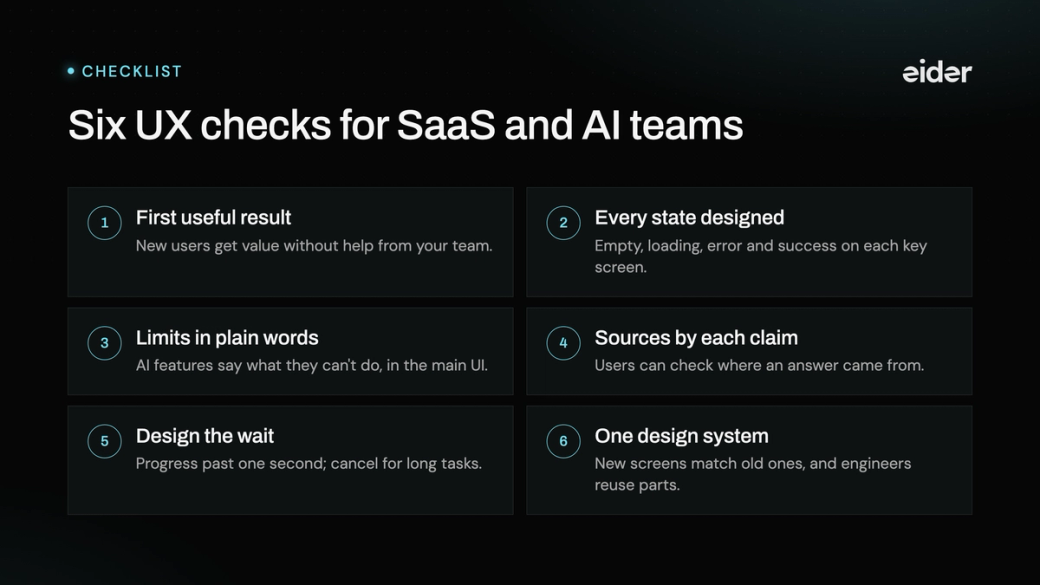
A SaaS and AI product UX checklist
Run through this before your next release. If you can't tick an item, that's where to start.
- New users reach a first useful result without help from your team.
- Every key screen has a designed empty, loading, error and success state.
- AI features say what they can and can't do, in plain words, in the main UI.
- AI answers show sources next to the claims they support.
- Anything that takes more than a second shows the system is working; long tasks show progress and can be cancelled.
- Users can edit, retry or undo AI output, and the product still works without it.
- There are suggested actions or examples, not only a blank prompt box.
- Components come from one design system, so new screens match old ones.
- Contrast, keyboard use and focus states meet WCAG 2.2 level AA.
- You track two or three UX metrics, such as activation or task completion, before and after changes.
Planning a SaaS or AI product? Book a call with eider, see how we designed 270+ screens and one design system for InstaWP, or explore our UI/UX design service.
FAQ: UI/UX design for SaaS and AI products
What is UI/UX design for SaaS and AI products?
It's the research, flows, interface design and testing behind a software product people use every day, plus the extra states AI adds, such as waiting, uncertain answers and errors. The goal is a product new users understand quickly and regular users can work in fast.
How is AI product UX different from regular SaaS UX?
AI product UX has to handle output that varies, can be slow and can be wrong. That means designing for trust, with sources and clear limits, plus progress feedback and easy ways to edit or retry results.
Should an AI product use a chat interface?
Not on its own. Research from Nielsen Norman Group points to a hybrid interface: chat for open requests, plus buttons, examples and guided steps for people who find writing prompts hard.
What does a SaaS product design engagement include?
Usually research, user flows, wireframes, final UI, a design system, a tested prototype and developer handoff. At eider this follows five steps: Discover & Define, Wireframe, Design, Prototype and Refine, and Handoff.
How much does SaaS UX design cost?
It depends on scope, research depth, platforms, AI features and whether you need a design system or build. We don't publish fixed product design prices; book a call and we'll give you a scoped estimate.
How long does a SaaS UI/UX project take?
A focused redesign of one flow can take a few weeks, while a full product with a design system takes a few months. The number of journeys, platforms and test rounds sets the timeline.
Is UX design worth it for an early-stage SaaS?
Yes, if it's focused. Fix the first-use journey and the core task first, measure activation and task completion, and grow the design system as the product grows.
About the author
Tushar Vaghasiya writes for eider about SaaS product design, AI products and UX. eider is a UI/UX design and development studio for SaaS and AI teams, founded in 2020 in Surat, India, working with clients worldwide in Figma, Framer, Webflow and custom code.
Sources
All pages checked on 20 November 2026.
- Pew Research Center: Young US adults are increasingly wary of AI: 52% of US adults more concerned than excited (June 2026 survey), up from 37% in 2021
- Nielsen Norman Group: Explainable AI in Chat Interfaces: overtrust, citations and disclosing limits (December 2025)
- Nielsen Norman Group: AI: First New UI Paradigm in 60 Years: the articulation problem and hybrid interfaces
- Nielsen Norman Group: Response Times: The 3 Important Limits: 0.1, 1 and 10 second limits
- Nielsen Norman Group: Designing Empty States in Complex Applications: three empty state guidelines
- Nielsen Norman Group: Usability ROI Declining, But Still Strong and Return on Investment for Usability: 83% average improvement in business metrics
- McKinsey: The Business Value of Design: 300 companies over five years; 32 and 56 percentage point gaps
- Microsoft Research: Guidelines for Human-AI Interaction: 18 guidelines, CHI 2019
- Google PAIR: People + AI Guidebook: explainability, trust, errors and graceful failure
- W3C: Web Content Accessibility Guidelines (WCAG) 2.2: accessibility standard referenced in the checklist
- eider: UI/UX design service (process), InstaWP, Sage Bio and Tami case studies, and the website cost calculator