Most SaaS teams don't come to us wanting a new website. They come because the current one can't keep up. Every new page waits on a developer, the homepage describes last year's product, and trial sign-ups are flat. A Framer website for SaaS fixes a lot of that, but only if it's planned and built well.
We're eider, a UI/UX design and development studio for SaaS and AI teams. We build in Framer, Webflow and custom code, so we don't need to sell you on one tool. This guide mixes what we see on real projects with what neutral research says about how buyers use SaaS websites.
You'll learn what converts in 2026, the Framer mistakes we fix most, real costs and platform fees, and how Framer, Webflow and custom code differ.
Short answer: a Framer website for SaaS is a good fit when your marketing team needs to ship pages fast without a developer. Expect $7,500 to $15,000 and 2 to 8 weeks for a 5 to 10 page design and build with us, plus roughly $360 to $840 a year in Framer fees. What converts is a clear message in the first screen, real proof, and a site your team can actually edit.
In this guide
- Why SaaS teams are moving to Framer
- What converts on a SaaS marketing site in 2026
- 6 Framer mistakes that quietly cost SaaS sign-ups
- How much does a Framer website for SaaS cost?
- Framer, Webflow or custom code: which fits a SaaS site?
- Is your Framer site ready for AI search?
- How eider plans, designs, builds and hands over a Framer site
- FAQ
TL;DR: Framer for SaaS in 2026
- Framer is built for speed of change. Designers and marketers can publish pages without a developer in the loop.
- Buyers decide fast. Research from Nielsen Norman Group shows people often leave a page within 10 to 20 seconds. Your first screen has to explain the product.
- Most buyers research alone first. Gartner found 61% of B2B buyers prefer a rep-free buying experience, so your site does early sales work.
- Real costs with eider: $7,500 to $12,500 for about 5 pages, design and build. Design-only or migration is about half.
- Platform fees are small but real: about $360 to $840 a year for Framer, depending on CMS needs.
- AI search needs no special tricks. Google says normal SEO basics apply: crawlable pages, clear text, structured data that matches the page.
- Ownership matters. Make sure the Framer project lives in your own workspace.
Why SaaS teams are moving their website to Framer
SaaS marketing moves fast: new features, new positioning, integration pages, campaign pages. On a hard-coded site, each one becomes a ticket for an engineer who'd rather work on the product. That's usually the real reason teams switch.
Here's what Framer gives a SaaS team out of the box, based on Framer's own pricing and help pages:
- Visual editing and publishing. Designers and marketers change pages and publish in one place.
- A built-in CMS. The Pro plan lists 10 CMS collections and 2,500 items, with paid add-ons beyond that. That covers a blog, changelog, customer stories and integration pages for most teams.
- SEO basics included. Framer generates a sitemap.xml and robots.txt automatically, and you can set page titles, descriptions and redirects.
- Hosting on a global CDN, so there's no separate server to manage.
- Growth add-ons: localization (priced per locale), A/B testing and a staging environment on the Pro plan.
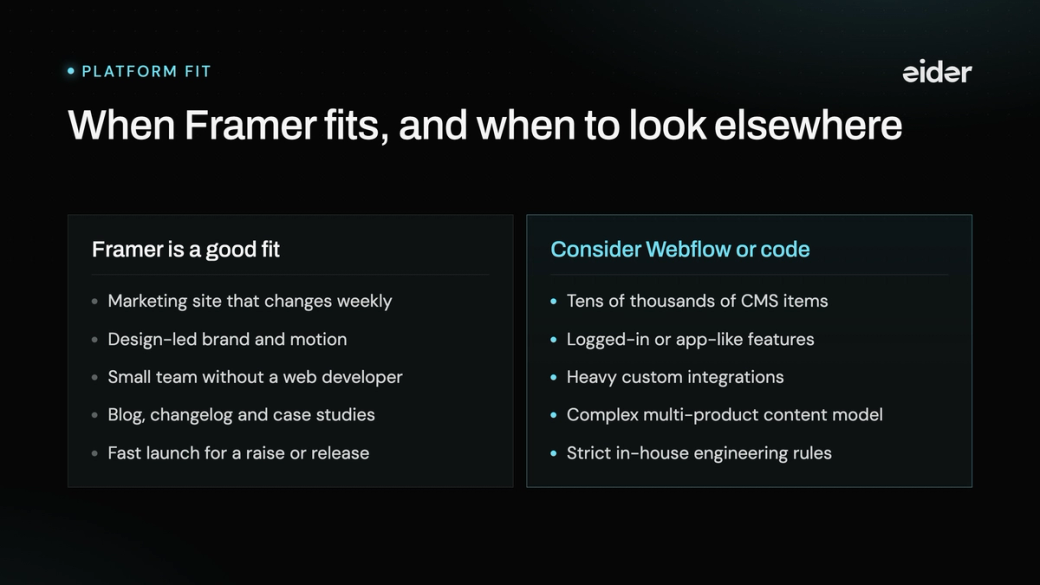
Framer isn't right for every SaaS site, though. Huge CMS libraries, logged-in features or heavy integrations may suit Webflow or custom code better.
What converts on a SaaS marketing site in 2026
The tool doesn't make a site convert. The content and structure do. Three pieces of research shape how we plan every SaaS homepage.
First, attention is short. Nielsen Norman Group's analysis of page visits found that users often leave web pages in 10 to 20 seconds, and that to earn more of their time you must clearly communicate your value proposition within 10 seconds. Second, buyers want to do their own research. A 2025 Gartner sales survey found that 61% of B2B buyers prefer a rep-free buying experience. Third, speed still matters. Google's research found that as mobile page load time goes from 1 second to 3 seconds, the probability of a bounce increases by 32%.
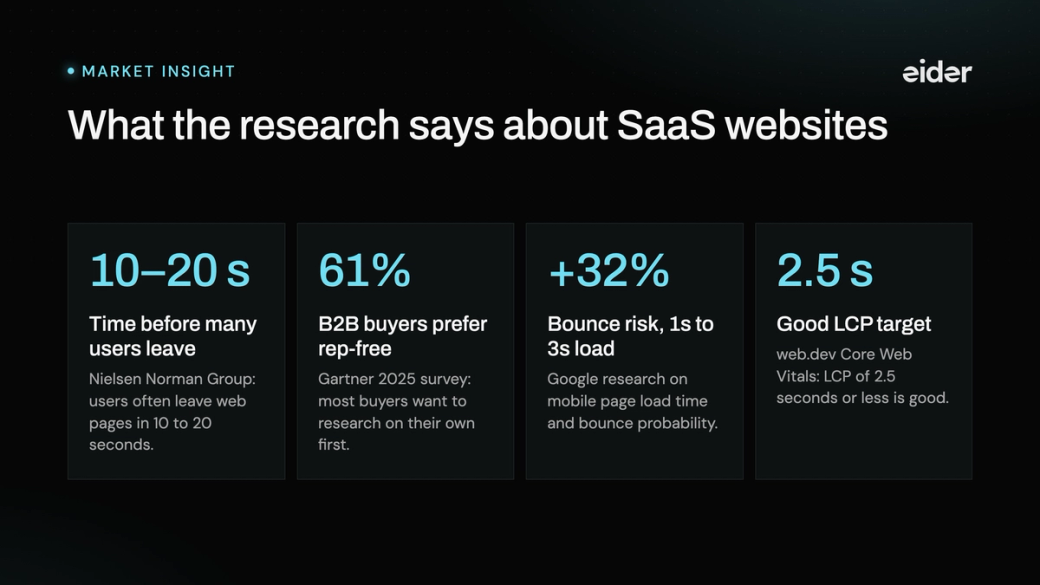
Put together, that means the site has to answer the buyer's questions on its own, quickly, on a phone. In practice, these are the parts of a SaaS site that do the most work:
Page section | Its job | What we check |
|---|---|---|
Hero (first screen) | Say what the product does and for whom | Can a stranger explain it back after 10 seconds? |
Product proof | Show the real product, not abstract art | Real screens or short clips, readable on mobile |
Social proof | Reduce risk | Named customers, real quotes, specific results |
Use cases or roles | Help each buyer find themselves | One clear path per audience, not a feature dump |
Pricing page | Answer cost before a sales call | Plans, limits and what happens after the trial |
Calls to action | Make the next step obvious | One primary CTA per page, repeated consistently |
Speed and stability | Keep people on the page | LCP 2.5 s or less, INP 200 ms or less, CLS 0.1 or less |
The speed targets in that last row come from Google's Core Web Vitals guidance on web.dev, measured at the 75th percentile of page loads.
6 Framer mistakes that quietly cost SaaS sign-ups
Framer makes it easy to go from design to a live site in days. It also makes it easy to ship problems you only notice months later. These are the six we see most often when we audit SaaS sites.
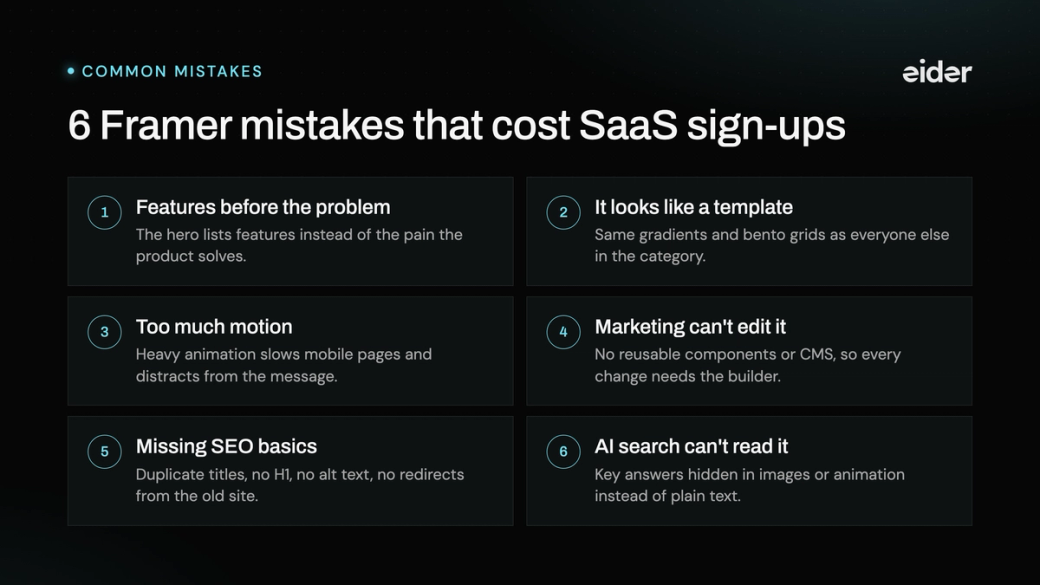
- Features before the problem. If the first screen doesn't say what you do, the rest rarely gets read.
- It looks like a template. If your site matches every competitor's, buyers won't remember you.
- Too much motion. Animation is easy in Framer, so it gets overused and mobile pages feel heavy.
- Marketing can't edit it. Without reusable components and a planned CMS, the site depends on its builder.
- Missing SEO basics. Duplicate titles, no H1, no alt text, no redirects from old URLs.
- AI search can't read it. Key answers sit in images or animated text, so AI tools have little to quote.
None of these are Framer's fault. They are planning problems, and they're cheaper to fix before launch than after.
How much does a Framer website for SaaS cost?
With eider, a Framer website for SaaS costs $5,000 to $7,500 for a single page and $7,500 to $12,500 for about five pages, design and build. These are the same ranges we publish in our website cost calculator. Design-only or a migration of an existing design is about half of design and build.
Site size | Design + build (eider) | Typical timeline |
|---|---|---|
1 page | $5,000–$7,500 | 2–3 weeks |
5 pages | $7,500–$12,500 | 2–8 weeks |
10 pages | $7,500–$15,000 | 2–8 weeks |
20 pages | $7,500–$20,000 | 1–3 months |
30 pages | $7,500–$25,000 | 1–3 months |
50+ pages | From $25,000 | Scoped per project |
Don't forget platform fees
Your build fee is one-off. Platform fees repeat every year. Here are the yearly ranges we use when planning a budget:
Platform | Yearly fees, no CMS | Yearly fees, with CMS |
|---|---|---|
Framer | $360–$600 | $600–$840 |
Webflow | $540–$1,116 | $660–$1,236 |
Custom code | $0–$240 | $0–$780 |
Framer's pricing page shows the building blocks behind those numbers. Site plans start at $10 a month (Basic) and $30 a month (Pro). Extra editors are $20 each per month, content-only editors are $10, and each extra locale is $20. Add-ons such as more CMS items, pages or bandwidth are priced separately. Check the page for current prices before you budget, because plans change.
Optional extras
- SEO and AEO setup: from $1,500.
- Brand identity refresh: $5,000–$10,000, if the site needs a new look as well.
- Ongoing support: a 25-hour pack for $1,500 a month for new pages, tests and fixes.
Framer, Webflow or custom code: which fits a SaaS site?
We build in all three, so here's a plain overview. It's high level on purpose. The right choice depends on your content, your team and your roadmap.
Framer | Webflow | Custom code | |
|---|---|---|---|
Best for | Design-led marketing sites that change often | Large content sites and complex CMS structures | Sites tied closely to the product or with custom logic |
Who edits | Designers and marketers | Marketers, with more setup needed | Mostly developers |
CMS scale | Pro lists 10 collections and 2,500 items, with add-ons | Built for bigger CMS needs; check current plan limits | No limit beyond what you build |
SEO basics | Sitemap, robots.txt, meta, redirects built in | Built in, with fine control | Whatever your team builds |
Speed to launch | Fastest | Fast | Slowest |
Yearly platform fees | $360–$840 | $540–$1,236 | $0–$780 |
A real example from our own work: Helios AI, a commodity intelligence platform, needed one website for three products, and that site is built in Webflow. Tool choice should follow the content model, not the other way round. Plans and limits change, so check Webflow's pricing page and Framer's before you decide.
Is your Framer site ready for AI search?
Buyers now ask ChatGPT, Claude, Perplexity or Google to shortlist tools. You don't need special tricks for this. Google's Search Central guidance says there are no additional requirements to appear in AI Overviews or AI Mode, and no special AI text files or markup are needed. The usual SEO fundamentals still apply.
Here's what that means for a Framer site:
- Keep important content in real text. Not inside images, videos or animated text layers.
- Answer questions directly. Use question-style headings and an FAQ with a one-sentence answer first.
- Use structured data that matches the page. Framer's SEO guide suggests JSON-LD; Google says it must match the visible text.
- Link pages together. Product, use case, pricing and blog pages should link to each other.
- Allow crawling. Make sure key pages are set to show in search engines in Framer's page settings.
Want to see where you stand? Our free AEO score checker shows whether ChatGPT, Claude, Perplexity and Google AI Overviews can find, read and cite your site.
How eider plans, designs, builds and hands over a Framer site
Our process is the same whether the site is 5 pages or 50. The difference is how long each step takes.
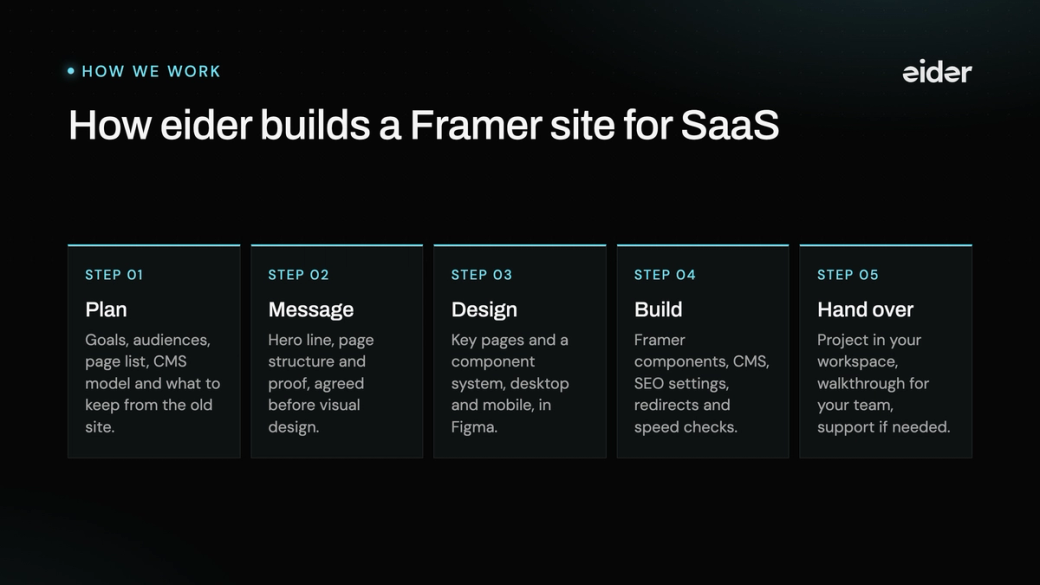
- Plan. Goals, audiences, page list, the CMS model (blog, changelog, integrations, stories) and old URLs to redirect.
- Message. We fix the homepage story first: who it's for, the problem, the proof, the next step.
- Design. Key pages and a reusable component set for desktop and mobile. You review real layouts, not mood boards.
- Build. Framer components and CMS your team can reuse, plus titles, alt text, redirects, structured data and mobile speed checks.
- Hand over. We walk your team through adding and editing pages, and the 25-hour support pack is there if you need it.
What this looks like on real projects
We often design the website and the product together, which keeps the story and the UI consistent. For Sage Bio, we went from the first app icon to 190+ mobile screens in light and dark, plus the website that explains it. For Tami, a fintech product, we designed the website and the mobile app that brings payments, business activity and cashback rewards together. For InstaWP, we designed core journeys from sign-up to going live across 270+ screens and one design system.
We've also designed marketing sites built around one action: Flowd's turns visits into booked calls, and Vantage Waste Solutions' brings in quote requests. See more case studies.
Not sure your homepage explains your product in 10 seconds? That's the first thing we look at. Book a free call and we'll review your current site, or start with our website cost calculator to get a budget range in two minutes.
FAQ: Framer websites for SaaS
Is Framer good for a SaaS website?
Yes, for most SaaS marketing sites, because designers and marketers can publish without a developer. For very large CMS libraries or heavy integrations, Webflow or custom code often fits better.
How much does a Framer website for SaaS cost?
With eider, a Framer website for SaaS costs $5,000 to $7,500 for one page and $7,500 to $12,500 for about five pages, design and build. Larger sites range up to $25,000, and 50+ page sites start from $25,000. Design-only or migration is about half.
How long does Framer development for SaaS take?
A single page usually takes 2 to 3 weeks, and a 5 to 10 page site takes 2 to 8 weeks. Sites with 20 or more pages usually take 1 to 3 months, depending on content and feedback speed.
What are Framer's yearly platform fees?
Plan on roughly $360 to $600 a year without a CMS and $600 to $840 with one. Framer's pricing page lists site plans from $10 a month (Basic) and $30 a month (Pro), plus paid editors, locales and add-ons.
Framer or Webflow for SaaS?
Choose Framer if speed of change and design control matter most, and Webflow if you have a large, complex CMS. Both handle SEO basics well. We build in both, so we pick based on your content model.
Do I need special work to show up in AI search?
No. Google says AI Overviews and AI Mode need no special markup, just normal SEO fundamentals. Clear text answers, internal links and accurate structured data help most.
Can you move our existing site to Framer?
Yes. A migration of an existing design costs about half of a full design and build, and we set up redirects from old URLs so you keep your search traffic.
About the author
Jay Vaghasiya is the founder of eider, a UI/UX design and development studio for SaaS and AI products, founded in 2020 in Surat, India. He leads design direction and frontend delivery on client projects, including InstaWP's SaaS dashboard and design system. eider designs and builds websites in Framer, Webflow and custom code for teams worldwide. More about the team on our about page.
Sources
All pages checked on 20 November 2026.
- Nielsen Norman Group: How Long Do Users Stay on Web Pages?: 10 to 20 seconds, value proposition within 10 seconds
- Gartner: Sales survey finds 61% of B2B buyers prefer a rep-free buying experience (June 2025)
- Think with Google: Page load time statistics: 1s to 3s load, 32% higher bounce probability
- web.dev: Web Vitals: LCP, INP and CLS thresholds
- Google Search Central: AI features and your website: no additional requirements for AI Overviews and AI Mode
- Framer: Pricing: site plans, editors, CMS limits, locales and add-ons
- Framer Help: Guide to Framer SEO features: sitemap, robots.txt, meta, redirects, JSON-LD
- Framer Help: How to set up redirects
- Webflow: Pricing
- eider: Website cost calculator: prices, timelines, platform fees and market ranges
- eider: AEO score checker
- eider: Case studies: InstaWP, Sage Bio and Tami